
HDD Raw Copy Tool 2.6 | Portable
HDD Raw Copy Tool is a utility for low-level, sector-by-sector hard disk duplication and image creation.
HDD Raw Copy Tool makes an exact duplicate of SATA, IDE, SAS, SCSI, SSD, USB, and other supported media.
It can create a sector-by-sector copy of all areas of the drive, including MBR, boot records, all partitions, hidden partitions, and the space between partitions.
HDD Raw Copy Tool does not depend on the operating system or filesystem on the source media.
Windows, Linux, macOS, and other filesystems or partition layouts can be copied as raw media as long as the hardware interface is supported.
If your media has a supported interface then it can be copied with HDD Raw Copy.
The tool can create exact raw (.img) images or newer resumable .imgcv2 images of the entire media, including service data such as MBR and boot records. A raw .img is the same general concept many users refer to as a dd image. All partitions as well as space in between are copied. All filesystems, including hidden ones, are copied as raw sectors.
Bad sectors are skipped by the tool. In v2, logging, resumable imaging, metadata, notes, and optional hashes are expanded for more advanced workflows.
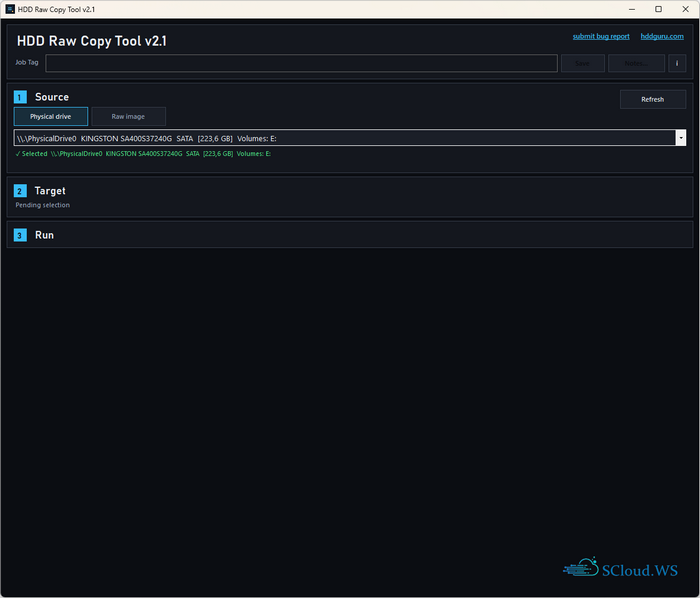
HDD Raw Copy Tool makes an exact duplicate of SATA, IDE, SAS, SCSI, SSD, USB, and other supported media.
It can create a sector-by-sector copy of all areas of the drive, including MBR, boot records, all partitions, hidden partitions, and the space between partitions.
HDD Raw Copy Tool does not depend on the operating system or filesystem on the source media.
Windows, Linux, macOS, and other filesystems or partition layouts can be copied as raw media as long as the hardware interface is supported.
If your media has a supported interface then it can be copied with HDD Raw Copy.
The tool can create exact raw (.img) images or newer resumable .imgcv2 images of the entire media, including service data such as MBR and boot records. A raw .img is the same general concept many users refer to as a dd image. All partitions as well as space in between are copied. All filesystems, including hidden ones, are copied as raw sectors.
Bad sectors are skipped by the tool. In v2, logging, resumable imaging, metadata, notes, and optional hashes are expanded for more advanced workflows.
Supported interfaces and media
- S-ATA (SATA), IDE (E-IDE), SCSI, SAS, USB, FIREWIRE
- USB and FIREWIRE external drive enclosures are supported
- SSD and HDD devices from Western Digital, Seagate, Toshiba, Samsung, Hitachi, Fujitsu, IBM, Quantum, Kingston, Intel, OCZ, Maxtor, and almost any other supported media
- FLASH media through a card reader, including SD/MMC, MemoryStick, CompactFlash, SmartMedia, and XD
- Large drives (LBA-48) are supported
Key Features
Who is this for?
- Home users: make a full image of a USB flash drive, back up a disk before recovery, or migrate to another drive
- Corporate users: capture full raw device images for backup, re-use, lab workflows, or internal archival
- Digital forensics users: acquire sector-level images with optional hashes, embedded logs, and job notes in
.imgcv2
Choose the right mode
- Raw
: plain raw image with broad compatibility; this is the same basic idea many users know as a.img
imagedd
: resumable image format with embedded logs, metadata, notes, and optional hashes.imgcv2- Read Only: read and validate the source without writing an output image
What v2 adds
- Modern Windows 10/11 release with a simpler workflow
- Resumable
images with embedded log, metadata, job tag, and notes.imgcv2 - Optional hashing: MD5, SHA-1, SHA-256, SHA-512
- Pause / resume and stop-for-resume-later for supported workflows
- Read Only mode for source validation without writing an output image
- Legacy v1 downloads remain available below for users who prefer the older release
Good to know
- For physical-drive work, run the tool as Administrator
- For the safest physical-drive imaging, exclusive source access is preferred
- File-only workflows, metadata viewing, and automation can be used without elevation
Examples of possible uses
- Data recovery: make a copy of a damaged drive and work from the copy
- Data recovery: image a damaged hard drive while skipping bad sectors
- Migration: completely migrate from one drive to another
- Backup: create an exact image of a disk or USB flash drive for later restoration
- Corporate imaging: store device images and restore them later
- Digital forensics: acquire raw sector images with detailed logs and optional hashes
- Software QA and lab workflows: restore prepared test systems from saved images
- Duplicate, clone, or save a full image of almost any supported media
Screenshots
Homepage
OS: Windows 10 | 11 (x86-x64)
Language: ENG
Medicine: FreeWare
Size: 33,89 | 111,33 MB.
Download From HomepageInstalleк & Portable


No comments