
RecCloud 1.3.10
RecCloud — record more than one screen. An intelligient app for dual screen or multi-screen recording. Freely customize recording area and enjoy fluent recording experience.
Features
Multi-screen Recording
Support recording multiple screens in full-screen or windows recording mode, saving each screen recording separately, or merging all the screens as one video.
Cloud Storaging
No need to worry about the hard disks don't have enough storage space since we can access and manage all our video files on the cloud at any time.
Online Sharing
Sharing videos from any device and sharing them with the world through RecCloud video management, we will see how fast and efficient the exchange of information is.
Gaming
Gameplayers can record all the game highlights through RecCloud multi-screen recorder, and share the videos with friends, families or followers.
Web Meeting
Use RecCloud as a quick and easy way to record meetings on multiple screens at the same time for later review and analysis.
Tutoring
Multi-screen recording is highly recommended for tutorial particularly. Not only the online course can be recorded, but teacher's explanations can be captured as well.
Presentation
If we are doing a presentation and displaying it on different devices, RecCloud is available for us to record the whole process and save all the important moments.
Desktop
The most basic feature is indispensable, which is recording our desktop. To be more accurate, recording multiple desktops together.
Monitoring
When it comes to a huge amount of monitors, it would be convenient for us to use multiple monitor recorder to record all the screens at once and save it as an entire video or save separately.
Support recording multiple screens in full-screen or windows recording mode, saving each screen recording separately, or merging all the screens as one video.
Cloud Storaging
No need to worry about the hard disks don't have enough storage space since we can access and manage all our video files on the cloud at any time.
Online Sharing
Sharing videos from any device and sharing them with the world through RecCloud video management, we will see how fast and efficient the exchange of information is.
Gaming
Gameplayers can record all the game highlights through RecCloud multi-screen recorder, and share the videos with friends, families or followers.
Web Meeting
Use RecCloud as a quick and easy way to record meetings on multiple screens at the same time for later review and analysis.
Tutoring
Multi-screen recording is highly recommended for tutorial particularly. Not only the online course can be recorded, but teacher's explanations can be captured as well.
Presentation
If we are doing a presentation and displaying it on different devices, RecCloud is available for us to record the whole process and save all the important moments.
Desktop
The most basic feature is indispensable, which is recording our desktop. To be more accurate, recording multiple desktops together.
Monitoring
When it comes to a huge amount of monitors, it would be convenient for us to use multiple monitor recorder to record all the screens at once and save it as an entire video or save separately.
Screenshots
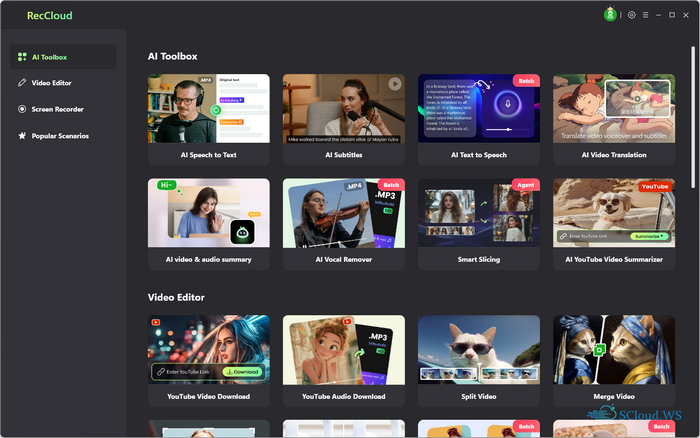
Homepage
OS: Windows 7 | 8 | 8.1 | 10 | 11 (x86-x64)
Language: ML | ENG
Medicine: Apowersoft Products Keymaker by Jasi2169.rar (16.05.2026)
Size: 2,29 MB.
Download From HomepageInstaller
Login or register to see spoiler's content


No comments