
FluentTweaker 26.05.25 Portable
FluentTweaker — modern, transparent and actually understandable Windows tweaking. No mystery buttons, no “ultimate FPS boost”, no registry roulette.
FluentTweaker is basically the sibling project to FluentCleaner,except instead of cleaning files, this one focuses on tweaking Windows itself
UI, taskbar, privacy, AI features, Explorer behavior, gaming tweaks, performance settings, hidden policies, system behavior...all the stuff power users usually end up changing manually through obscure registry edits, group policies or random forum posts from 2012.
Every tweak is inspectable, categorized and reversible. no giant «optimize now» buttons that secretly change 40 things at once and leave you guessing what broke afterwards.
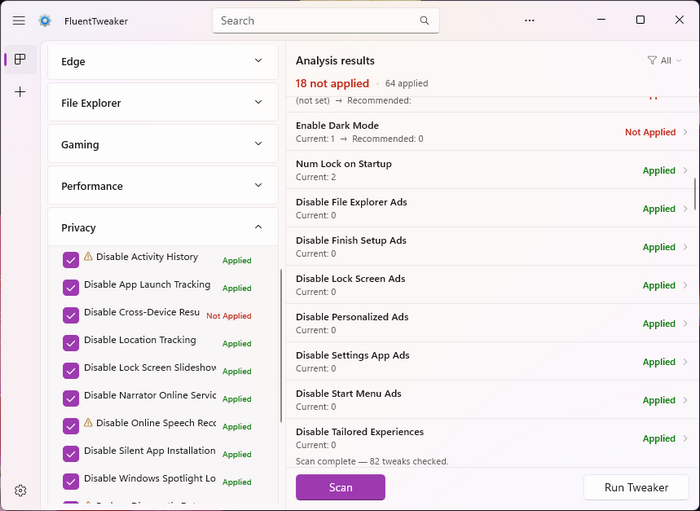
FluentTweaker is basically the sibling project to FluentCleaner,except instead of cleaning files, this one focuses on tweaking Windows itself
UI, taskbar, privacy, AI features, Explorer behavior, gaming tweaks, performance settings, hidden policies, system behavior...all the stuff power users usually end up changing manually through obscure registry edits, group policies or random forum posts from 2012.
Every tweak is inspectable, categorized and reversible. no giant «optimize now» buttons that secretly change 40 things at once and leave you guessing what broke afterwards.
Features
FluentTweaker avoids the usual tweak-tool nonsense:
- no fake turbo mode
- no magic FPS promises
- no mystery scripts from unknown sources
- no tweaking things just for the sake of tweaking them
Instead it focuses on:
- transparency
- safety
- reversibility
- modern UX
- and helping users actually understand what a tweak does before applying it
Key Features
- 60+ tweaks across Ads, AI, Edge, Gaming, Privacy, System, Taskbar, UI
- Scan before you apply;see current vs. recommended value
- Backup registry to .reg before applying
- Filter & sort results (Not Applied / Applied / Unknown)
- Reset tweaks to Windows default
- Custom tweaks via .ini files (Custom/ folder)
- Additional database support; load your own wintweak2.ini
- Database updater;pull latest wintweak2.ini from GitHub
- Explorer restart prompt for tweaks that need it
- Windows 10 / 11 filtering;only relevant tweaks shown
- Dark & light mode, Mica backdrop
Screenshots
Homepage | What's New
OS: Windows 10 | 11 (x86-x64)
Language: ML | ENG | RUS
Medicine: FreeWare
Size: 0,96 | 0,87 MB.
Download From HomepagePortable


No comments