
Hasleo WinToUSB 10.8.0.2 | Enterprise | Professional | Technician | Portable
WinToUSB (also called Windows To USB) is the best free Windows To Go (WTG) Creator which allows you to install and run a fully-functional Windows on external hard drives, USB flash drives or Thunderbolt drives. With just three steps and a few minutes, you can easily and efficiently create your first portable Windows 11/10/8/7 (X64/X86/ARM64) or Windows Server directly from an ISO, WIM, ESD, SWM, VHD, VHDX, DBI file (DBI is the extension for the backup image files generated by Hasleo Backup Suite) or from a CD/DVD drive.
Alternatively, you can clone your currently running Windows installation to a USB or Thunderbolt drive as a portable Windows system. WinToUSB also supports creating Windows installation USB drives from Windows 11/10/8/7 and Windows Server installation ISOs, allowing you to effortlessly install Windows from the USB drive.
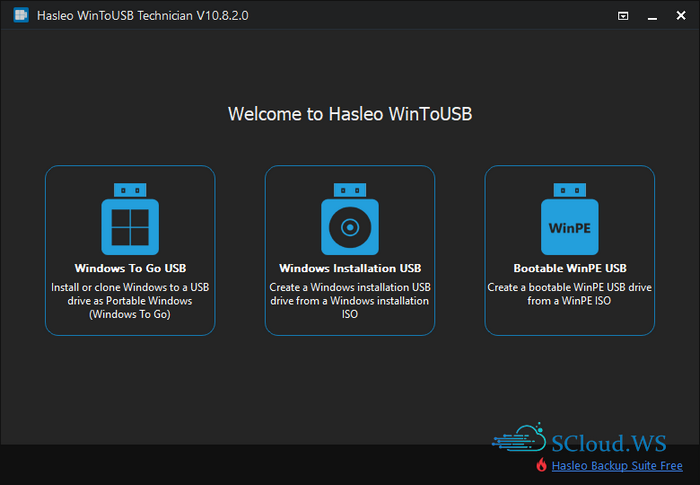
Alternatively, you can clone your currently running Windows installation to a USB or Thunderbolt drive as a portable Windows system. WinToUSB also supports creating Windows installation USB drives from Windows 11/10/8/7 and Windows Server installation ISOs, allowing you to effortlessly install Windows from the USB drive.
Features
Windows To Go (Portable Windows) Creator
WinToUSB allows you to install & run fully-functional Windows on an external HDD/SSD, USB flash drive or Thunderbolt drive, which means you can carry the portable Windows drive to anywhere and use it on any computer
Windows Installation USB Creator
WinToUSB Introduces a «Windows Installation USB Creator» feature, which enables you to create a bootable Windows installation USB drive from Windows 11/10/8/7/Vista (X64/X86/ARM64) or Windows Server 2008 and later ISO files in just a few steps. The created USB drive is compatible with Windows installation on both Legacy BIOS and UEFI systems.
Windows PE Bootable USB CreatorThis feature enables you to create a bootable Windows PE USB drive that works on both Legacy BIOS and UEFI computers, by transferring and converting Windows PE ISO contents to the USB.
WinToUSB allows you to install & run fully-functional Windows on an external HDD/SSD, USB flash drive or Thunderbolt drive, which means you can carry the portable Windows drive to anywhere and use it on any computer
- Faster installation and cloning speed compared to competing products
- Creation of Windows To Go from ISO, WIM, ESD, SWM, VHD(X) files or CD/DVD drives
- Creation of Windows To Go from system backup image generated by Hasleo Backup Suite
- Clone currently running Windows installation to a USB/Thunderbolt drive as Windows To Go
- Create BitLocker-encrypted Windows To Go
- Create portable Windows for Mac computers
- Update existing Windows To Go with Delta Clone technology
- Create VHD(X)-based Windows To Go
- Create Windows To Go on certified or uncertified USB drives
- Support any version of Windows 11/10/8/7 and Windows Server 2008 or later
Windows Installation USB Creator
WinToUSB Introduces a «Windows Installation USB Creator» feature, which enables you to create a bootable Windows installation USB drive from Windows 11/10/8/7/Vista (X64/X86/ARM64) or Windows Server 2008 and later ISO files in just a few steps. The created USB drive is compatible with Windows installation on both Legacy BIOS and UEFI systems.
- Bypass Windows 11 system requirements (TPM 2.0, Secure Boot and Minimum hardware)
- Bypass Microsoft account requirements for Windows 11
- Install Windows on both Legacy BIOS and UEFI computers by using the same USB drive
- Automatically create a local account, set the time zone and region, etc.
- Install Windows on both Legacy BIOS and UEFI computers by using the same USB drive
Windows PE Bootable USB CreatorThis feature enables you to create a bootable Windows PE USB drive that works on both Legacy BIOS and UEFI computers, by transferring and converting Windows PE ISO contents to the USB.
Screenshots
Homepage | What's New
OS: Windows 7 | 8 | 8.1 | 10 | 11 (x86-x64)
Language: ML | ENG | RUS
Medicine: Crack
Size: 112,66 | 597,78 MB.
Download From HomepageInstaller
Login or register to see spoiler's content
Login or register to see spoiler's content


No comments