
VovSoft AI Automator 1.2 | Portable
Vovsoft AI Automator is a lightweight Windows desktop utility that lets you schedule, manage, and run AI language model workflows locally or via cloud APIs, right from your PC with full control and privacy.
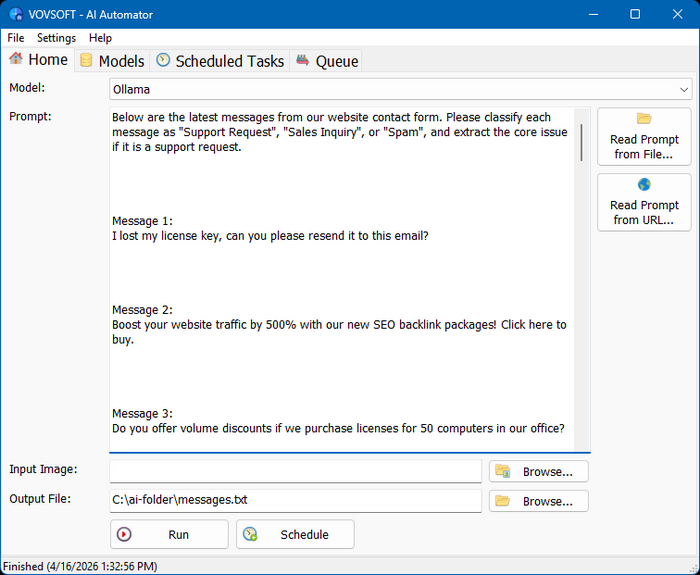
Features
Local Hardware & Cloud Flexibility
The software is designed to work with local AI runtimes such as Ollama and LM Studio, which can take advantage of your existing hardware. It can utilize your CPU and GPU for local inference, including NVIDIA RTX, AMD, and Intel. The application can also connect to cloud AI services like OpenAI, Anthropic Claude, and Gemini, allowing you to choose between local model execution and fast cloud-based processing depending on your needs.
AI Task Scheduler
Setting up scheduled tasks is completely effortless. You can assign prompts to your preferred model to run at specific time intervals, allowing you to choose the exact number of minutes between executions, automating periodic tasks. By configuring the execution timer — combined with the option to auto-run at Windows startup and minimize to the system tray — the software operates silently in the background, continuously interacting with your chosen large language models and saving the results directly to your local drive. This transforms repetitive API interactions into a smooth, completely unattended process.
Batch Prompt Scheduler
The built-in queue system allows you to load batches of text prompts and image/audio inputs to be processed sequentially. You can also manually edit workflows using tasks.json and models.json files, giving full control over execution behavior without relying only on the GUI. This makes it easy to structure and manage workflows at scale. Instead of manually waiting for one response to finish before sending the next, you can line up hundreds of tasks and step away. The program will systematically route each input to your chosen LLM, and save the generated outputs into your specified destination files.
Flexible Prompt Input
The software can read prompt from external sources, giving you full flexibility in how you define your AI queries. Supported input methods include:
Simplified AI Automation
The true advantage of this utility lies in its absolute simplicity. While complex automation platforms like n8n or AI agents like OpenClaw offer broad capabilities, they often introduce unnecessary overhead. They typically require configuring and maintaining dedicated servers or cloud instances, which completely contradicts a private, local-first workflow. Furthermore, because of their complex agentic background processes, they can consume massive amounts of tokens, quickly making API usage unexpectedly pricey. In contrast, Vovsoft AI Automator operates entirely as a desktop application on your existing Windows machine. It executes exactly what you schedule with complete transparency, ensuring predictable token usage without any hidden server costs or complicated infrastructure to manage.
The software is designed to work with local AI runtimes such as Ollama and LM Studio, which can take advantage of your existing hardware. It can utilize your CPU and GPU for local inference, including NVIDIA RTX, AMD, and Intel. The application can also connect to cloud AI services like OpenAI, Anthropic Claude, and Gemini, allowing you to choose between local model execution and fast cloud-based processing depending on your needs.
AI Task Scheduler
Setting up scheduled tasks is completely effortless. You can assign prompts to your preferred model to run at specific time intervals, allowing you to choose the exact number of minutes between executions, automating periodic tasks. By configuring the execution timer — combined with the option to auto-run at Windows startup and minimize to the system tray — the software operates silently in the background, continuously interacting with your chosen large language models and saving the results directly to your local drive. This transforms repetitive API interactions into a smooth, completely unattended process.
Batch Prompt Scheduler
The built-in queue system allows you to load batches of text prompts and image/audio inputs to be processed sequentially. You can also manually edit workflows using tasks.json and models.json files, giving full control over execution behavior without relying only on the GUI. This makes it easy to structure and manage workflows at scale. Instead of manually waiting for one response to finish before sending the next, you can line up hundreds of tasks and step away. The program will systematically route each input to your chosen LLM, and save the generated outputs into your specified destination files.
Flexible Prompt Input
The software can read prompt from external sources, giving you full flexibility in how you define your AI queries. Supported input methods include:
- File: Load your prompt directly from a local file on your system, making it easy to reuse, version, and edit prompts outside the application.
- URL: Fetch prompt content from a specified web address, enabling dynamic or remotely managed prompt workflows.
Simplified AI Automation
The true advantage of this utility lies in its absolute simplicity. While complex automation platforms like n8n or AI agents like OpenClaw offer broad capabilities, they often introduce unnecessary overhead. They typically require configuring and maintaining dedicated servers or cloud instances, which completely contradicts a private, local-first workflow. Furthermore, because of their complex agentic background processes, they can consume massive amounts of tokens, quickly making API usage unexpectedly pricey. In contrast, Vovsoft AI Automator operates entirely as a desktop application on your existing Windows machine. It executes exactly what you schedule with complete transparency, ensuring predictable token usage without any hidden server costs or complicated infrastructure to manage.
Screenshots
Homepage | What's New
OS: Windows 7 | 8 | 8.1 | 10 | 11 (x86-x64)
Language: ENG
Medicine: Patch v1.0.0.10 by RadiXX11 (DC 16.01.2023) / Keygen v1.2.1 by BTCR (27.03.2026)
Size: 24,53 | 30,74 MB.
Download From HomepageInstallerPortable
Login or register to see spoiler's content
Login or register to see spoiler's content


No comments