
Windows Repair & Troubleshoot Tool 2.0 Portable by ahfie27
✅Multi-Language Support
15 Languages Included:
English, Bahasa Indonesia, Español, Français, Deutsch, Português, Русский, 中文 (简体), 日本語, العربية, हिंदी, 한국어, Italiano, Türkçe, ไทย
Dynamic UI Translation: All interface elements update instantly when language is changed.
🎨 Customizable Themes
10 Built-in Themes:
Default, Dark, Blue, Green, Purple, Orange, Red, Cyberpunk, Ocean, Forest
Real-Time Theme Switching: Apply themes without restarting the application.
⚙️ Settings Management
Registry-Based Settings: Saves preferences in Windows Registry (
)HKCU\Software\ECOMTECH\WindowsRepairTool
Persistent Configuration: Remembers window size, position, last tab, language, and theme between sessions.
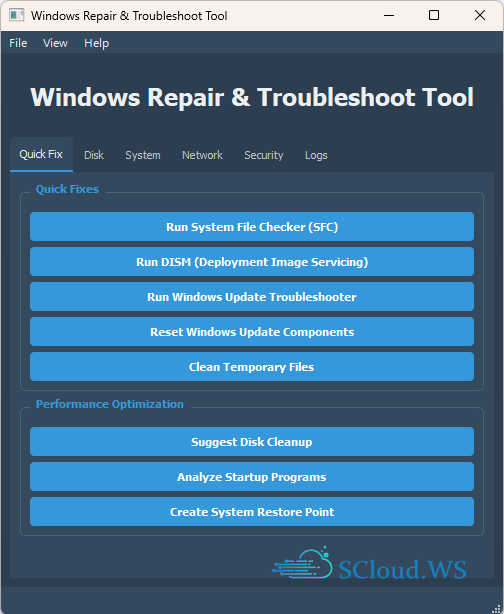
1. Quick Fix
Run System File Checker (SFC)
Execute DISM (Deployment Image Servicing)
Windows Update Troubleshooter
Reset Windows Update Components
Clean Temporary Files
Performance Optimization
Analyze Startup Programs
Create System Restore Point
2. Disk
Disk Diagnostics (CHKDSK)
Analyze Disk Usage
Optimize Drives (Defragment)
Storage Management
Configure Storage Sense
Clean WinSxS Folder (Advanced)
3. System
Real-time System Information Display
System Configuration Tools
Boot Configuration (msconfig)
Services Manager
Event Viewer
Device Manager
4. Network
Network Diagnostics
Reset Network Configuration
Flush DNS Cache
Reset Winsock Catalog
Network Adapter Troubleshooter
Connection Tests (Ping, Tracert, Speed Test)
5. Security
Security Scans (Windows Defender Quick Scan)
Firewall Status Check
UAC Settings Verification
Privacy & Telemetry Controls
Configure Diagnostic Data
6. Logs
Detailed Repair Log with Timestamps
Clear/Export Log Functionality
Generate Comprehensive Repair Reports
Summary of Scans, Repairs, and Issues Found
Homepage | What's New
OS: Windows 10 | 11 (x86-x64)
Language: ML | ENG | RUS
Medicine: FreeWare
Size: 36,40 MB.


2 comments