
Input Director 2.4
Input Director enables the control of multiple Windows systems using the keyboard/mouse attached to one computer Switch control between systems either by hotkey or by moving the cursor to the screen edge on one computer for it to appear on the next one. Input Director supports a shared clipboard — copy on one computer, switch control, and paste.
Features
- Easy to follow installation and usage guides — setup only takes a few minutes
- Input Director's flexible monitor layout system makes it easy to accurately reflect a monitor's physical location and size:
- Multi-monitor support
- Shared Clipboard — copy and paste between computers (including files!)
- Compatible with Windows 11, Windows 10, Windows 8/8.1 and Windows 7
- Profiles make it simple to manage different sets of computers and monitor layouts
- Only Input Director ensures the cursor remains visible and correct if the mouse is disconnected on a Windows 10 or Window 11 system
- Transitioning control to another computer is as simple as moving your cursor off the screen on one computer for it to jump to the other
- Able to control a computer without needing to login to it first
- Supports Windows fast user switching
- Compatible with Windows User Account Control pop-ups
Key Features
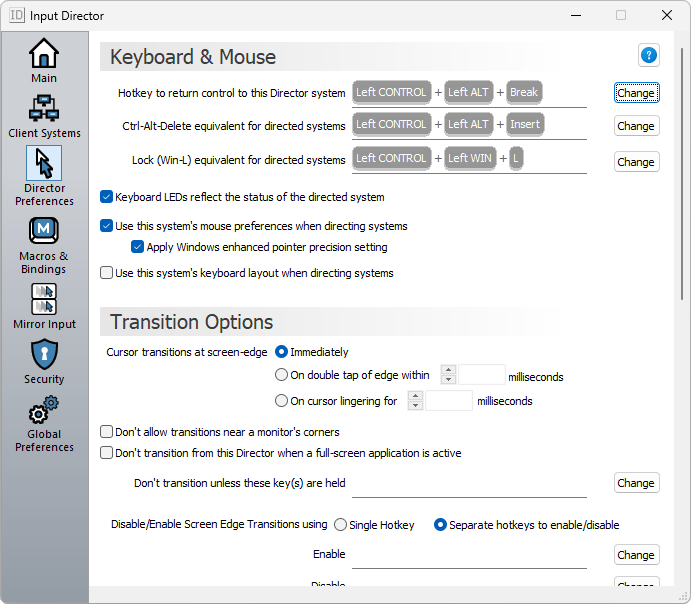
- Choose to use your mouse (speed, button order) preferences when directing another system
- Supports different keyboard layouts
- The keyboard LEDs (Caps Lock, Scroll Lock and Num Lock) reflect the status of the computer being controlled
- Mirror input — Broadcast mouse gestures and/or keyboard input to all computers simultaneously
- Keyboard macros — record a sequence of keystrokes that can then be run by hotkey. Macros can be broadcast to all computers, played on the system being controlled, or tied to a particular computer
- Key bindings — permanently bind a key to another key on a specified system
- A semi-transparent information window can be overlaid on any (or all) systems, pointing to the system currently being controlled.
- With the click of a check box a system can temporarily be skipped
- A command line tool makes it easy to query and drive Input Director from a script
- On startup a system will inform other Input Director systems that they are available
- Systems inform related Input Director systems when they're about to be shutdown or rebooted and the Director system will automatically skip them when navigating between computers
Screenshots
Homepage | What's New
OS: Windows 7 | 8 | 8.1 | 10 | 11 (x86-x64)
Language: ENG
Medicine: FreeWare
Size: 65,44 MB.
Download From HomepageInstaller


No comments