
PhoXoSee 1.12 Build 2606 | Portable
PhoXoSee — experience the next generation of image viewing: blazing-fast loading speeds, ultra-low memory usage, and powerful built-in tools — all in a lightweight app with a sleek, modern UI.
Quickly find photos by date taken, batch convert HEIC to JPEG, preview HEIC, SVG & PSD thumbnails in Windows Explorer, and instantly crop images with simple, precise controls — all while enjoying smooth real-time visual effects.
No ads. No bloat. Just pure speed. 100% FREE and Open Source.
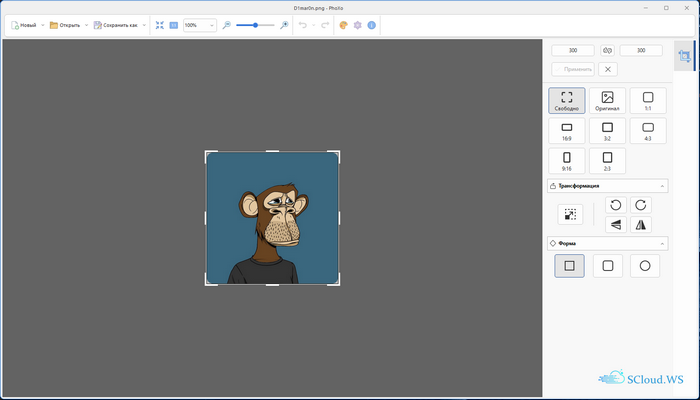
Quickly find photos by date taken, batch convert HEIC to JPEG, preview HEIC, SVG & PSD thumbnails in Windows Explorer, and instantly crop images with simple, precise controls — all while enjoying smooth real-time visual effects.
No ads. No bloat. Just pure speed. 100% FREE and Open Source.
Features
- Blazing fast and Lightweight Image Viewer
- Real-time image processing enhances your viewing experience
- searching photos by capture date
- supporting full-screen and borderless image viewing
- batch conversion from SVG to PNG format
Key Features
Lightning Fast
Speed is the most important thing in an image viewer. PhoXoSee is built with performance in mind from the ground up.
Thanks to highly optimized code, everything feels smooth and responsive — from launching the app to browsing and working with large images.
Lightweight Design
With its minimal footprint, PhoXoSee takes up very little disk space. The installation package is only 5 MB, making it ideal for any computer.
Thanks to its compact design, it also uses very little memory and has minimal impact on your work or internet browsing. You can even run it in a virtual machine.
Better Viewing
Built on PhoXo’s core, the function has been optimized for modern multi-core CPUs, enabling real-time image processing. Tasks like brightness adjustment and sharpening can now be done without professional image editing software.
When working with large images, PhoXoSee uses Mipmap technology to enhance image quality, delivering a smoother and more detailed viewing experience.
Powerful tools
PhoXoSee offers a variety of useful tools, including searching photos by capture date, viewing the GPS location where a photo was taken, simple and intuitive cropping, and batch converting HEIC to JPEG format.
The UI is fully configurable, supporting both full-screen and borderless viewing, and comes with built-in support for 12 languages.
For added convenience, a portable version is also available.
Speed is the most important thing in an image viewer. PhoXoSee is built with performance in mind from the ground up.
Thanks to highly optimized code, everything feels smooth and responsive — from launching the app to browsing and working with large images.
Lightweight Design
With its minimal footprint, PhoXoSee takes up very little disk space. The installation package is only 5 MB, making it ideal for any computer.
Thanks to its compact design, it also uses very little memory and has minimal impact on your work or internet browsing. You can even run it in a virtual machine.
Better Viewing
Built on PhoXo’s core, the function has been optimized for modern multi-core CPUs, enabling real-time image processing. Tasks like brightness adjustment and sharpening can now be done without professional image editing software.
When working with large images, PhoXoSee uses Mipmap technology to enhance image quality, delivering a smoother and more detailed viewing experience.
Powerful tools
PhoXoSee offers a variety of useful tools, including searching photos by capture date, viewing the GPS location where a photo was taken, simple and intuitive cropping, and batch converting HEIC to JPEG format.
The UI is fully configurable, supporting both full-screen and borderless viewing, and comes with built-in support for 12 languages.
For added convenience, a portable version is also available.
Screenshots
Homepage | What's New
OS: Windows 10 | 11 (x86-x64)
Language: ML | ENG | RUS
Medicine: FreeWare
Size: 5,16 | 4,51 MB.
Download From HomepageInstaller & Portable


No comments